BINHEX CLOUD · ODOO WITH AI
Odoo with AI: explore BinHex Copilot.
Add AI to your existing Odoo where the setup supports it. We review compatibility before proposing changes. Explore the BinHex Cloud AI agents.
Version: review required Setup: scoped to your Odoo Timing: after assessment Proposal: tailored to your project

Add AI to the Odoo you already use
BinHex Copilot is the route to assess when you already have Odoo and want AI assistance with business records and tasks. Keeping your existing system is the starting point; feasibility depends on its version, hosting, modules and customizations.
Agree the records the agent may access, the actions it can perform and the decisions your team must review. Test those boundaries before activation.

Odoo compatibility: version and hosting
Confirm your exact build, edition and modules. These are assessment routes, not certified compatibility results.
| Version to assess | Self-hosted / BinHex Cloud | Odoo.sh | Odoo Online |
|---|---|---|---|
| Odoo 17 | Review deployment and modules | Review branch and modules | Check SaaS build and integration limits |
| Odoo 18 | Review deployment and modules | Review branch and modules | Check SaaS build and integration limits |
| Odoo 19 | Review deployment and modules | Review branch and modules | Check SaaS build and integration limits |
Odoo Online does not support custom server modules. External API access depends on the Odoo subscription. An API route still requires a separate Copilot compatibility assessment.
Platform references: hosting and modules · external API access.
AI in Odoo, module by module
Examples to assess with your installed apps, data and permissions. Confirm the supported actions during the pilot.
Sales & CRM
Prepare the next sales task.
Customer activity, follow-up drafts and quotation preparation.
Purchasing
Review supplier information.
Purchase drafts and approval routing to assess.
Inventory
Use reliable stock records.
Stock exceptions and replenishment suggestions to assess.
Customer Support
Prepare a response.
Ticket context, reply drafts and knowledge searches.
Finance & Invoicing
Review document details.
Invoice drafts and document extraction for validation.
HR & People
Reduce administrative work.
Onboarding checklists and internal policy queries to assess.
Permissions, traceability and setup requirements
Confirm these conditions for your installation before enabling an agent.
| Area | What to review | Acceptance check |
|---|---|---|
| Version and edition | Exact build and installed modules | Compatibility confirmed for your setup |
| Customizations | Custom and OCA modules | Required workflow tested |
| Hosting | Deployment and connection options | Permitted integration route |
| Data | Required records and business rules | Representative examples reviewed |
| Permissions | User, company and record access | Restricted-user tests passed |
| Approvals | Sensitive actions and exceptions | Review and stop conditions tested |
| Traceability and privacy | Logs, providers and retention | Responsibilities and data handling agreed |
You stay in control
Define the actions that may run and those that need review. Test the controls with real examples.
Tasks to assess
Customer activity
Follow-up drafts
Draft orders
Ticket classification
Stock exceptions
Document extraction
Actions to review
Sending invoices
Confirming purchases
Changing commercial terms
Processing payments
Updating approved records
Deletion permissions: restrict explicitly
Native Odoo AI and BinHex Copilot
Native Odoo AI
Odoo 19 documents built-in AI assistance and agents with topics and tools. Available actions depend on configuration and installed apps. Check what your current setup already covers.
BinHex Copilot
For your existing Odoo, assess Copilot against the workflow you need: required records, supported actions, business rules and human review. Confirm the additional setup and responsibilities with BinHex.
Read Odoo’s agent documentation or discuss your setup with BinHex.
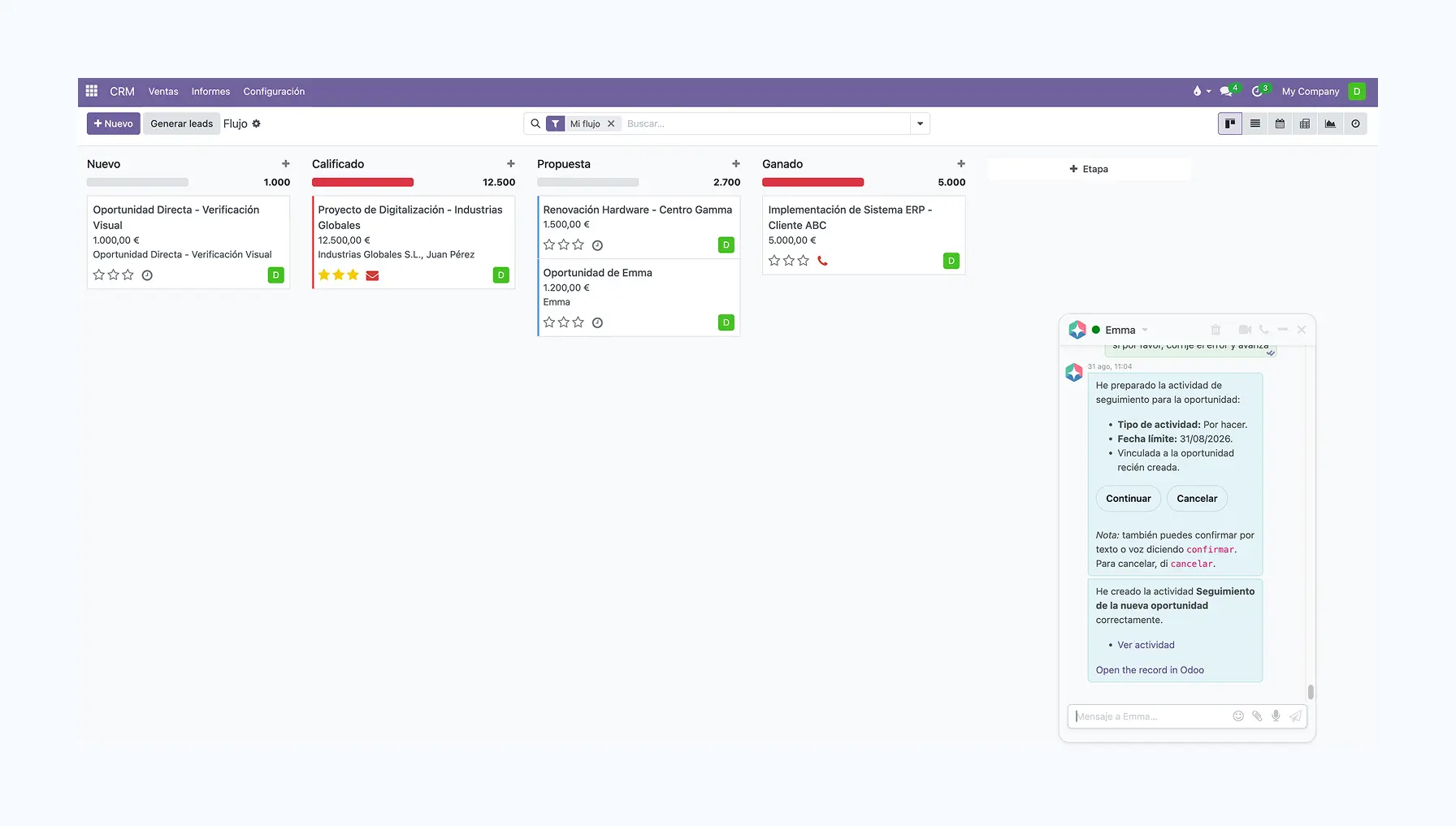
BinHex Cloud: business software with AI
Considering a complete business platform? Explore BinHex Cloud, its apps and AI agents. If you want to keep your existing Odoo, discuss the Copilot route with our team.
Discover BinHex Cloud ERP with AI.
How we add agents to your Odoo
Scope and timing are agreed after reviewing your installation.
1
Review your Odoo
Check hosting, modules, data and the first task to automate.
2
Configure and test
Test supported actions, permissions, approvals and exceptions in an agreed environment.
3
Activate and monitor
Approve the pilot, explain the workflow and assign an owner for monitoring.
Start with your Odoo. Define the right AI setup.
Review the processes your team already uses
Identify the required records and business rules
Test access and approval boundaries
Agree deployment, support and responsibilities


Audit your Odoo with AI
Review data quality before automation. These are checks to scope and validate; findings need human review before records are changed.
Potential duplicate contacts, products or suppliers
Missing fields needed for the chosen workflow
Inconsistent records or business rules
A prioritised correction plan to agree with your team
Connect ChatGPT or Claude to BinHex Cloud via MCP
Explore the BinHex Cloud MCP connection. For an existing Odoo installation, confirm the available integration route before assuming the same connection is supported.
Agree exposed records, available tools and approval boundaries.
Keep your Odoo or review a new platform?
Compare the changes each route requires for your business.
| What to check | Move to a new platform | Copilot for your existing Odoo |
|---|---|---|
| Database | Plan the transfer | Check the connection route |
| Deployment | Scope rollout and training | Scope setup and pilot |
| Customizations | Review adaptations | Test compatibility |
| AI tasks | Compare supported tools | Validate the selected tasks |
| Permissions | Configure and test roles | Verify access boundaries |
| Project scope | Agree implementation needs | Request a tailored proposal |
15 years building Odoo. Now with AI that knows your business.
Binhex has been building Odoo for more than 15 years. We know the platform inside out — and now we bring the AI layer to the Odoo you already run.
" We added agents to the Odoo we already had — no migration, no second login. That alone was worth it. "
Odoo with AI — questions
Keeping your Odoo is the starting point. Whether this is feasible depends on hosting, modules and the integration route. Confirm compatibility before committing to a migration-free setup.
Provide your exact version, edition and module list. The table identifies the checks for Odoo 17, 18 and 19; it does not certify every installation. Community and Enterprise configurations require assessment.
Agree the actions that may run and those that must wait for review. Test permissions, exceptions and stop conditions before activation.
Explore MCP with BinHex Cloud. For a separate Odoo installation, first confirm the connector, available tools and access restrictions with the team.
Discuss checks for duplicates, missing fields or inconsistencies in the selected records. Validate the available tools and review findings before applying corrections.
Configured apps, usable records, defined business rules and tested access controls. The assessment identifies the required modules, connections and setup work.
Timing depends on compatibility, customizations and testing. Agree a schedule after assessment, including pilot review and rollout.
Confirm the AI providers, applicable terms and data settings for your project. Agree processing location, retention and permitted uses before sharing records.
Discuss your installation and intended workflows with BinHex. The team will define the scope and provide a tailored proposal. Talk to a Copilot specialist.
Put AI to work inside your Odoo.
Tell us your Odoo version, hosting and the task you want to improve. We will review the scope with you.