Different methods:
We're going to list the different methods of teleworking. While many more exist, these are the ones we know, have implemented, and configured on various occasions.
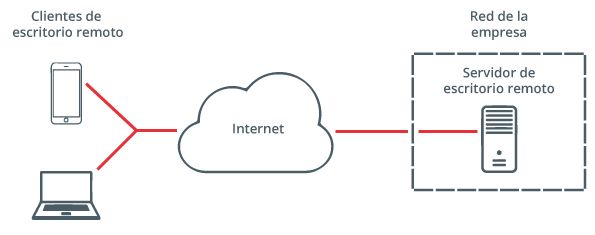
In addition to these third-party applications, there is the remote desktop connection (an old and insecure method, which is not currently recommended):
Remote desktop connection is built into Windows operating systems.
Accessing your company's network from home and working remotely to use stored information and other tools like email or the ERP system is essential for teleworking. To do so securely and ensure that information is transmitted while respecting its confidentiality, at Binhex we recommend using a virtual private network (VPN).
Do you need a VPN system? Talk to an expert now.
Our systems administration team is ready to help you.
Third-party applications to control your PC desktop.
We generally use these applications to provide occasional technical support, but not for persistent data transfer.

Any desk
The Windows-compatible AnyDesk software is available from €8.99 per month, has a free version, and offers a free trial for a limited time.
It is generally fast and lightweight. The user must run an application that will provide them with an ID to access the PC. This ID can be protected with a password for unattended operation.
You can see its features here.
Chrome Remote Desktop
It's a Google application that lets you control your computer remotely using the Chrome browser. This means you can access and control your computer from another device. You'll not only control the browser, but you'll also have access to your entire computer and all your documents.
Here's a link with all the information you need to set it up. It involves a few steps, and while it's not as easy to configure as some other tools, it's a very useful free resource.

TeamViewer
It is one of the most popular solutions for businesses today, but like everything, this tool can have some limitations and risks.
Especially regarding security and image quality, many users are not entirely satisfied, and although there are many options on the market, they all come from external providers.
TeamViewer is available from €27.90. You can check the prices here.
You can try it for a limited time. Here's the download link for various operating systems.
Tip: Change your passwords frequently.
Although it's a fundamental aspect of cybersecurity, one of the most common mistakes users make is using the same password for all accounts or passwords that are too short and simple. To properly and effectively protect our information, it's recommended to use long passwords, such as easy-to-remember phrases that are different for each account and include uppercase letters, lowercase letters, numbers, and symbols.
Telecommuting