Connect your banks with Odoo easily: Plaid integration in Binhex Cloud
Managing bank transactions can be a tedious process when done manually. Bank reconciliation, balance updates, and cash flow monitoring often require time and effort. However, thanks to the integration of Plaid with Odoo on Binhex Cloud, businesses can synchronize their bank accounts automatically and seamlessly.
The problems of manual banking management
-
Slow and error-prone bank reconciliations
- Manual data entry can lead to discrepancies and loss of key information.
-
Delays in updating transactions
- Without an automated connection, companies may operate with outdated balance sheets, affecting financial decision-making.
-
Lack of real-time visibility into cash flow
- Companies need accurate and up-to-date information to maintain effective financial control.
What is Plaid and why is it an ideal solution?
Plaid is a platform that allows you to connect bank accounts with financial applications securely and efficiently. With its integration into Binhex Cloud, Odoo users can automatically import transactions, eliminating the need for manual data entry.
Discover the Benefits of a 100% Open Source Platform
Explore how to enjoy unlimited users, unlimited applications, and community support with our open source solution.
Plaid integration with Odoo in Binhex Cloud: Ready to use
🔹 No complex configurations: The integration comes pre-installed on Binhex Cloud, ready to use without any additional development.
🔹 Automatic transaction import: Bank transactions are continuously synchronized in Odoo.
🔹 Fast and error-free bank reconciliation: Save time and avoid discrepancies in financial statements.
🔹 Maximum security and compliance: Plaid guarantees secure connections with banks, protecting your company's financial information.
Benefits of syncing your banking with Odoo
✔ Complete automation of banking management
✔ Always up-to-date financial information
✔ Greater accuracy in accounting reconciliations
✔ Optimized cash flow in real time
✔ Ease of use for startups and SMEs
Transform your company's financial management with Binhex Cloud
If you want to eliminate manual processes and improve your business's financial control, try integrating Plaid with Odoo on Binhex Cloud. Enjoy automated and efficient banking management.
Operating Guide: Connecting Plaid with Odoo in Binhex Cloud
Before you begin, make sure you meet the following requirements:
- Have an active account on Binhex Cloud.
- Have access to Plaid or be a customer of a compatible bank.
- Have your bank login credentials.
Step-by-step guide to connecting Plaid with Odoo
Step 1: Prerequisites
- Make sure you have installed the Accounting application through the application selector Binhex Cloud.
- If you haven't installed accounting from Binhex Cloud, you can go to Applications in your Odoo application -> Search for "Plaid" in the search bar -> Activate.
- Have access to Plaid or be a customer of a compatible bank.
- Have your bank login credentials.
Step 2: Select the bank integration option
- Go to Billing/Accounting > Settings > Online Bank Statement Providers.
- Within Online Bank Statement Providers, choose the Connect a Bank Account option.
- Select Plaid as your connection provider.
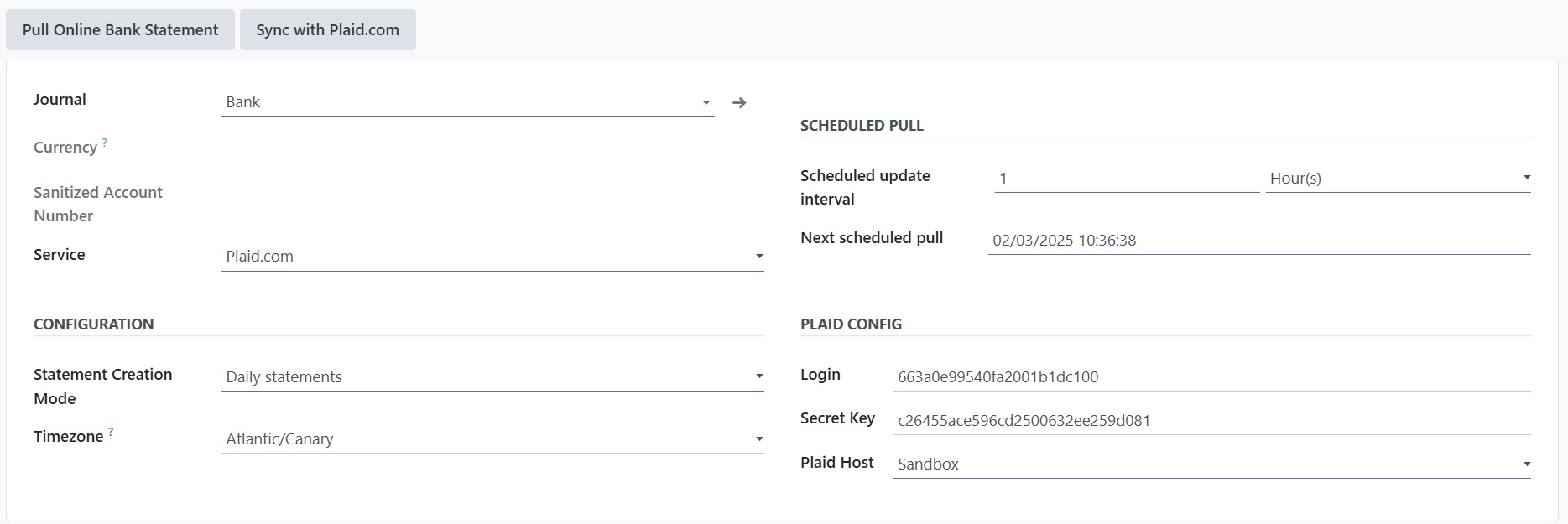
Step 3: Setting up the Plaid connector
- In the Plaid connector settings section, complete the following fields:
- Service: Select Plaid.com.
- Statement Creation Mode: Choose between Daily Statements or another frequency according to your company's needs.
- Time Zone: Select the appropriate time zone to synchronize your data correctly.
- Plaid Configuration: Provide the necessary credentials:
- Login: Enter your Plaid login ID.
- Secret Key: Enter your secret key provided by Plaid.
- Plaid Host: Configure whether you are using the Sandbox, Development, or Production environment.
4. How automatic bank reconciliation works
- Binhex Cloud automatically associates bank transactions with existing invoices and payments.
- You can review and approve reconciliations in the Accounting > Bank Reconciliation module.
- In case of discrepancies, you can manually adjust the amounts or assign transactions to specific invoices.
5. Solving common problems
Problem: Transactions are not synchronizing
- Verify that the connection with Plaid is active in Billing/Accounting > Settings > Online Bank Statement Providers.
- Check that your bank is correctly linked to Plaid.
Problem: Error connecting to the bank
- Try disconnecting and reconnecting your bank account.
- Make sure the credentials entered are correct.
Problem: Not all my bank accounts are showing up
- Some banks require you to enable access to multiple accounts within the Plaid settings.
FAQs
Yes, Plaid uses bank-grade encryption and secure authentication to protect your financial information.
Yes, you can connect multiple accounts from different banks within the same integration process.
You can disable the connection from Billing/Accounting > Settings > Online Bank Statement Providers and by removing the link with Plaid.
Easily connect your banks to Odoo: Plaid integration in Binhex Cloud